

Last Updated: August 2026 — WoW Midnight Patch 12.1, Season 2
The best WoW addons in 2026 are not the biggest download list. Midnight already gives you better nameplates, boss alerts, cooldown tracking, and a native damage meter. Installing 30 overlapping tools on top of that just moves the problem from “I missed the mechanic” to “I cannot see the mechanic.”
This guide builds a smaller setup for Patch 12.1. Every addon needs one clear job: organize bags, improve map information, review a run, or give your group useful context.
Table of Contents
- What Midnight changed
- Best WoW addons by job
- Three clean setups
- Group-content setup
- Install and update safely
- FAQ
What Midnight Changed About WoW Addons
Midnight moved more combat information into the base game. Blizzard’s official UI overview introduced improved nameplates, a server-side damage meter, and built-in boss alerts. The Cooldown Manager also handles ability and buff tracking that once pushed almost every player toward a custom aura package.
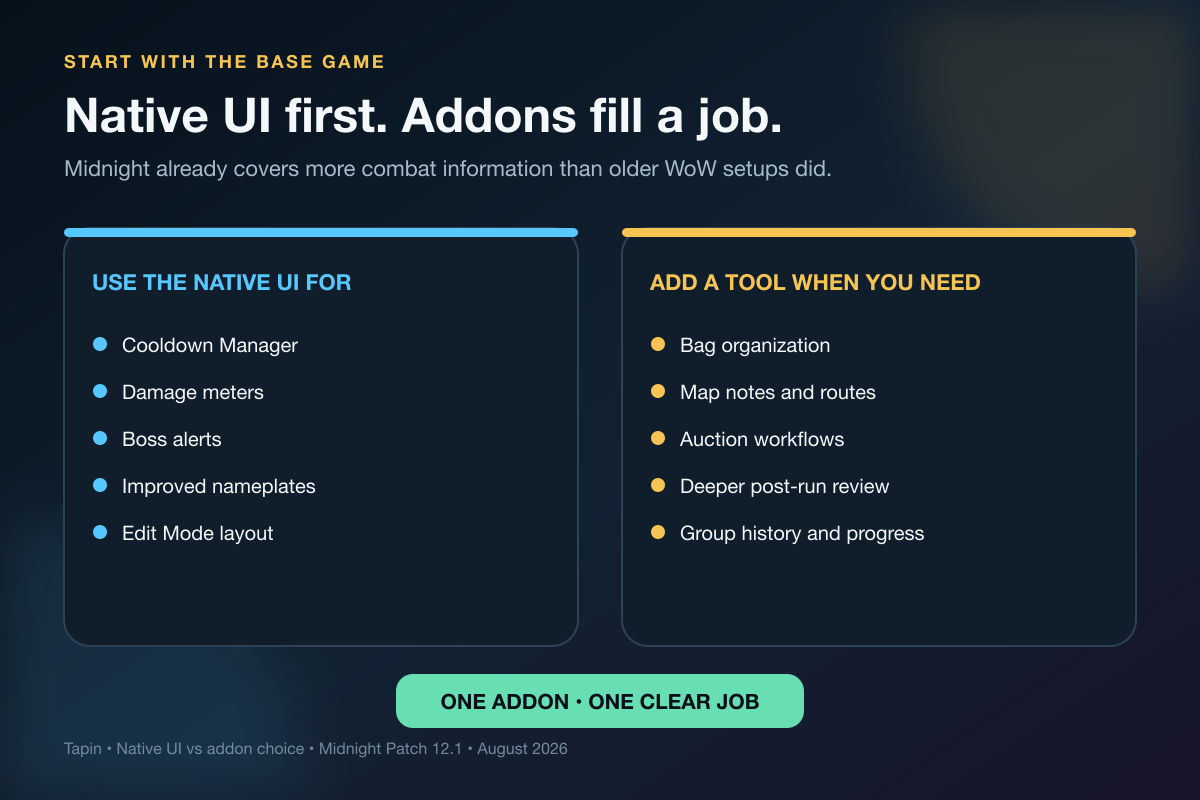
That does not make addons dead. It changes the test.
Before installing anything, ask: What exact problem does this solve that the native UI does not? If the answer is vague, leave it disabled.
Build around the people you actually play with. If your tank calls routes, your healer calls dispels, and somebody reviews wipes after the run, the UI should make those three jobs clearer—not create three new channels of noise.
Blizzard also restricted how combat addons can use protected information in Midnight. Its combat-addon explanation says visual customization remains part of WoW, while tools that calculate or communicate hidden combat decisions in real time face tighter limits.
That means an old WeakAuras import or nameplate profile may not behave exactly as it did before Midnight. Test current versions yourself. Do not build a Season 2 UI around a three-year-old import and hope the error box is bluffing.
Best WoW Addons for Midnight Patch 12.1
This list uses four filters:
- the project supports Retail WoW;
- the addon page shows active maintenance;
- the tool solves a specific job;
- the feature does not merely duplicate the base UI.
There is no universal winner. A raid leader, collector, auction-house regular, and returning player should not run the same stack.
Baganator: clean bags without a full UI replacement
Baganator turns inventory into category or single-view layouts. That sounds basic until a gearing night leaves you with crests, consumables, profession materials, old trinkets, and three items you swear you will compare later.
Use it if bag search and sorting are the problem. Skip it if the default combined bag already works for you.
Plumber: modular quality-of-life fixes
Plumber is a collection of small interface improvements rather than one giant replacement. Its project page lists modules for inventory-like currencies and other interaction cleanup.
Turn on only the modules you use. The point is to remove friction, not to enable every checkbox because it exists.
HandyNotes plus the Midnight plugin: map information
HandyNotes: Midnight Treasures and Rares adds Midnight treasures, rare mobs, weekly reputation rewards, profession knowledge items, and Delve chests to the map. It requires the base HandyNotes addon.
The plugin can hide already-collected or low-priority markers. Use that filter. A map with every possible icon visible is not information; it is confetti.
Pair it with our WoW Delves guide when you are planning a Coiled Isle route instead of wandering between objectives.
TomTom: waypoints that survive a long route
TomTom adds coordinates, reusable waypoints, and a directional arrow. It earns a slot when you are following a treasure route, profession circuit, or achievement path with several stops.
If you only need one map pin, the native map is enough. TomTom becomes useful when the route has an order.
Auctionator: everyday auction-house work
Auctionator adds item-price tooltips, shopping lists, posting protection, and crafting cost views. It is built for normal buying and selling—not for turning every login into an economy spreadsheet.
Check prices, build a consumable list, post carefully, and leave. An addon should shorten the auction-house visit.
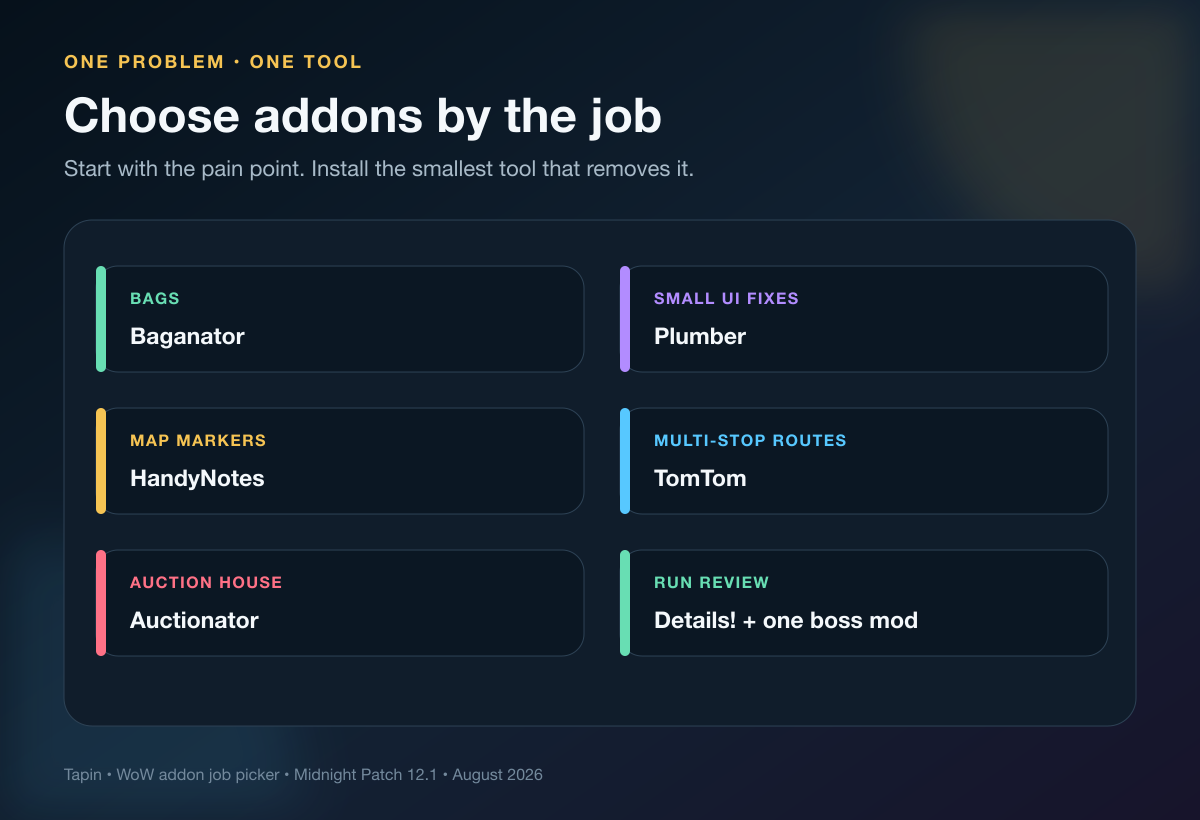
DBM or BigWigs: pick one boss-mod style
Deadly Boss Mods focuses on encounter information that is easy to process and tells you what needs attention. BigWigs takes a modular, lightweight approach to boss timers and tools.
Choose one, configure its sound and alert priorities, then run the content. Running both because you fear missing a timer usually creates duplicate bars and competing audio.
The base game now supplies boss alerts, so a boss mod needs to improve your timing—not shout the same mechanic twice.
Details!: deeper post-run review
Midnight has a native damage meter. Details! still offers broader combat analysis and lists a Retail 12.1 release on its project page.
Use it after the pull. Check interrupts, deaths, damage taken, or a repeated mechanic. Staring at the live damage column while standing in poison is a very expensive way to confirm you were top DPS for six seconds.
Raider.IO: group context, not a personality test
Raider.IO’s addon shows Mythic+ scores, raid progress, and recruitment information in player tooltips. That can help a group leader understand experience before inviting somebody.
Treat the number as context. It cannot tell you whether the player communicates, adjusts after a wipe, or stays for the next run. Our WoW LFG guide uses a short trial block because behavior matters after the invite.
Three WoW Addon Setups That Stay Clean
Install for the content you play this month, not for every activity WoW has ever shipped.
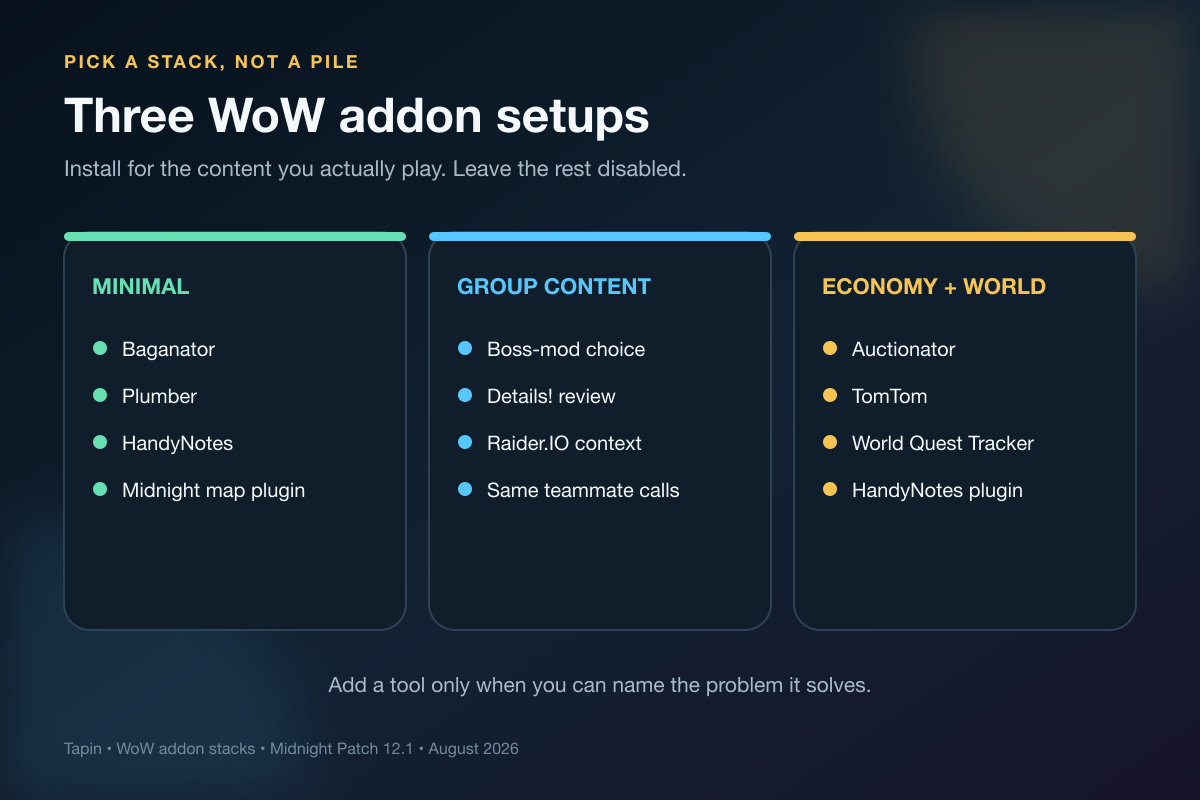
Minimal setup
- Baganator for inventory.
- Plumber for selected quality-of-life modules.
- HandyNotes plus the Midnight plugin for map goals.
- Blizzard’s Cooldown Manager, damage meter, boss alerts, and Edit Mode for combat.
This is the right starting point for a returning player. Add one tool only after a real session exposes a gap.
Group-content setup
- DBM or BigWigs for encounter timing.
- Details! for post-run review.
- Raider.IO for experience context in Premade Groups.
- Baganator for consumables and gear cleanup.
Use our Midnight Season 2 Mythic+ guide to pair the UI with route, utility, and recovery roles. The addon can show the timer. Your group still needs somebody to call the reset.
Economy and world-content setup
- Auctionator for buying, posting, and shopping lists.
- HandyNotes plus the Midnight plugin for map targets.
- TomTom for multi-stop routes.
- World Quest Tracker if the default world-quest view slows you down.
World Quest Tracker adds custom quest tracking and map views. Install it when you are comparing several world quests at once, not because every guide says you need a quest addon.
Use WoW Addons to Improve the Next Run
A clean UI gives the group a shared picture. It does not create shared decisions.
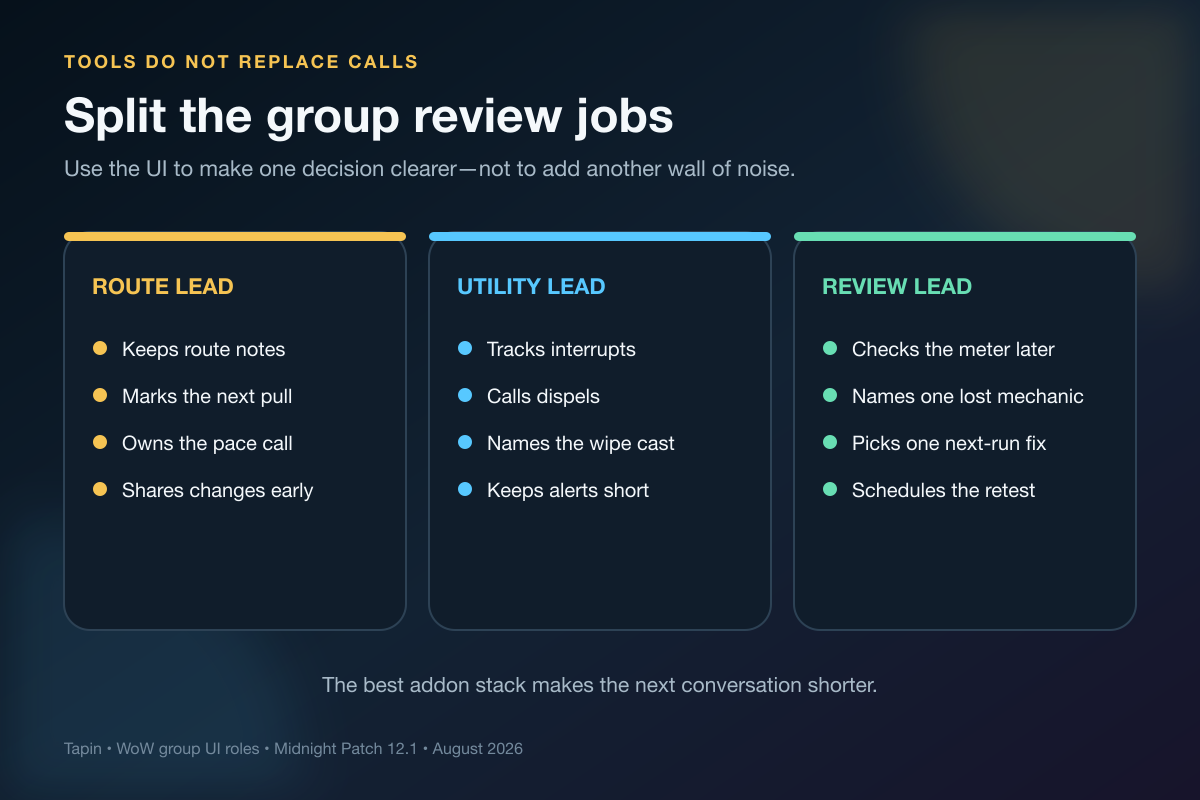
Split the jobs before a three-run block:
- Route lead: marks the next pull and owns pace changes.
- Utility lead: calls the important interrupt, dispel, or defensive.
- Review lead: checks the meter after the run and names one fix.
I believe this is where most “perfect UI” projects go wrong. Players keep adding information when the real gap is ownership.
If your usual group is offline, find a World of Warcraft teammate on Tapin for a defined dungeon, Delve, or raid-prep block. Agree on the goal and communication style first, then keep the addon setup quiet enough that both players can still hear each other.
Never share your Battle.net login. A teammate can guide the route, review the run, and practice beside you without touching your account.
How to Install and Update WoW Addons Safely
Patch week is when a five-minute update becomes a 45-minute UI rebuild. Use a fixed sequence.
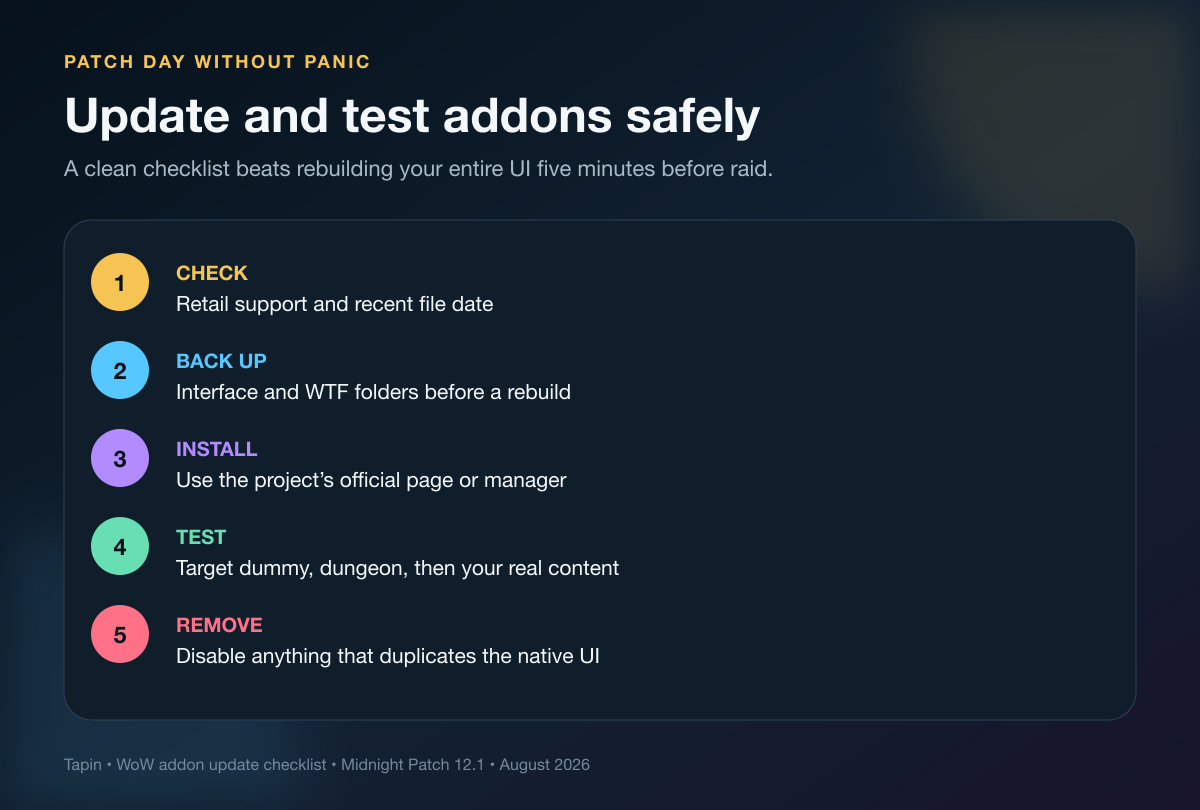
- Check the project page. Confirm Retail support, the current game version, dependencies, and a recent file.
- Back up your Interface and WTF folders. Keep the working profile before changing ten addons at once.
- Use the official project page or a known addon manager. Avoid random reposts and mystery zip files.
- Update one layer at a time. Base UI, core addons, then optional plugins.
- Test in stages. Target dummy, follower or normal dungeon, then the content you care about.
- Remove duplicates. Two boss mods, two bag replacements, or three cooldown displays are not extra safety.
⚠️ Watch Out: Do not force-load an outdated addon in progression content just because the login screen offers the checkbox. Test it somewhere cheap first.
Best WoW Addons FAQ
What are the best WoW addons for Midnight?
Start with Baganator, Plumber, and HandyNotes plus its Midnight plugin for a light setup. Add DBM or BigWigs, Details!, and Raider.IO only if you regularly run organized group content.
Does WoW Midnight still need addons?
No addon is mandatory for basic play. Midnight’s native UI includes stronger nameplates, cooldown tracking, boss alerts, and a damage meter; addons are most useful for specialized jobs such as bags, map routes, auction workflows, and deeper review.
Should I use DBM or BigWigs?
Use one. DBM emphasizes direct encounter warnings, while BigWigs emphasizes modular boss timers and tools. Test both separately and keep the alert style that you process faster.
Does Details! still work in Patch 12.1?
The Details! project page lists Retail support and a 12.1 release. Its value is deeper combat review beyond the base meter, but you should still confirm the latest file before installing after a patch.
Are WeakAuras broken in Midnight?
Midnight changed access to protected combat information, so old imports may lose or change behavior. Use the current addon version, verify the author’s Midnight notes, and test each import instead of assuming an older setup is reliable.
Keep the UI Quiet
The best WoW addons solve the problem in front of you and disappear when the pull starts. Begin with the native UI, add one tool per job, and remove anything that creates more noise than clarity.
Your next clean run will come from the same three things it always did: readable information, short calls, and people who come back for another attempt.